Get ready to experience the best music, made for business!

Let’s get your Custom Channels player set up so you can start playing the perfect soundtrack for your space.

Red circle with the number one, indicating the first step in the setup process.
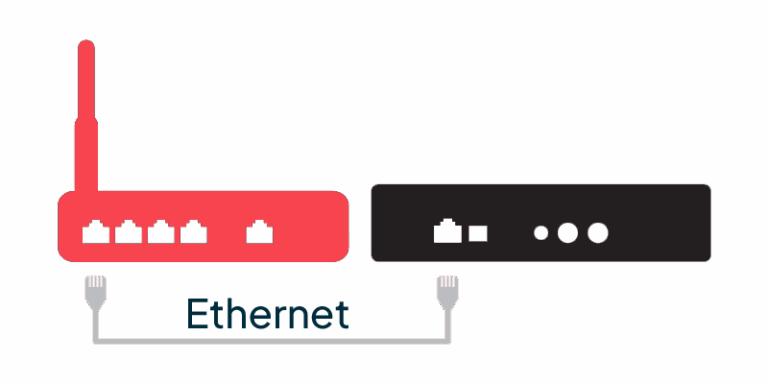
Custom Channels media player being connected to an ethernet cable and router, showing the simple setup process for business music streaming.

Connect to the Internet

- Use the ethernet cable to connect music player to the Internet connection / router
Red circle with the number 2, indicating the first step in the setup process.
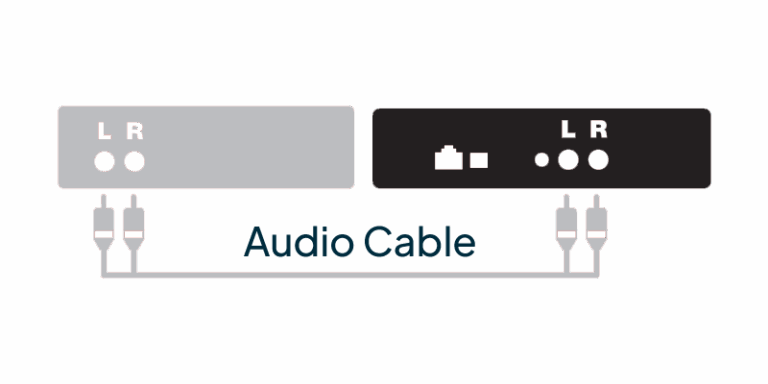
Custom Channels media player connected to a stereo using RCA audio cables, showing the easy setup for playing licensed business music.

Connect to the Amplifier

- One end of the audio cable to the music player
- The other end of the audio cable to the AUX or CD Input on the amplifier
Red circle with the number three, indicating the first step in the setup process.
Custom Channels media player being plugged into its power cable and wall outlet, showing how easy it is to set up and start streaming licensed business music.

Connect to Power

- Using the supplied 5V power adapter, connect the music player to power

That’s it! The player may take up to 30 seconds to buffer and play music music.

Music Players on Us
We're Waiving your Hardware Costs

Sign up by Dec. 31, and music players for new locations will be included at no cost.

CLAIM OFFER

No setup fees. Offer ends Dec 31, 2025.